
How to Gift Heroes and Skins to Friends in Mobile Legends: Bang Bang
Want to surprise a teammate or treat a close friend in Mobile Legends: Bang Bang? Gifting in-game content is one of the best ways to show your appreciation. In ...
Want to surprise a teammate or treat a close friend in Mobile Legends: Bang Bang? Gifting in-game content is one of the best ways to show your appreciation. In this guide, we'll break down how to send heroes and skins to other players.
Moonton developers constantly release new content. While you can gift almost any character or skin, there are several key details you should know before spending your Diamonds.
Can I Gift a Hero I Already Own?
An important note: in MLBB, you cannot transfer a hero that is already unlocked on your account. Even if you don't play them, there is no "transfer of ownership" feature. A gift is always processed as a new purchase through a dedicated menu.
Steps to Gift a Hero:
- Go to the in-game Shop.
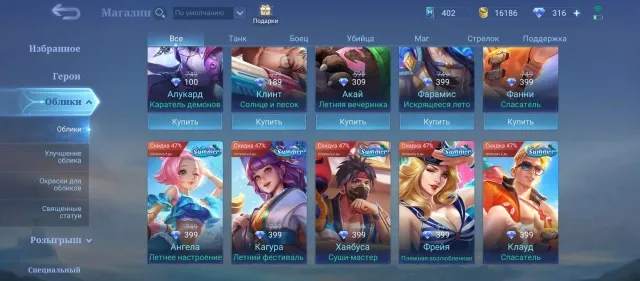
- Look for the gift icon (yellow symbol) at the top of the interface.
- In the menu, select the Mobile Legends heroes tab.
- Find the character you want to give and tap the gift button.
- Select a friend from your list and confirm the payment with Diamonds.
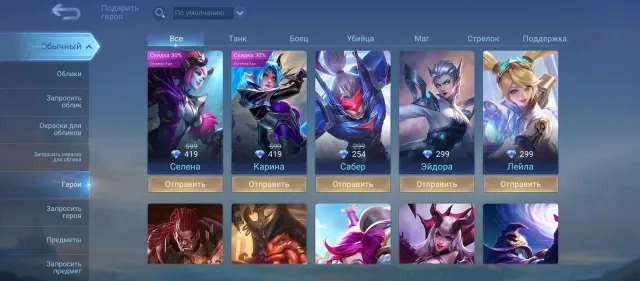
Once confirmed, the hero will instantly appear in your friend's in-game mail.
How to Send a Skin as a Gift
The skin gifting system works identically: you cannot gift a skin from your own collection or a previously obtained paint. The gift must be purchased specifically for the recipient.
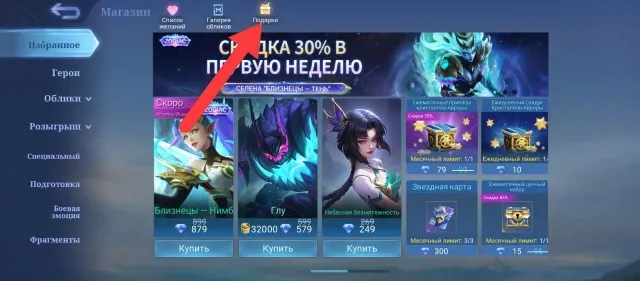
Action algorithm:
- Enter the "Gifts" section in the Shop.
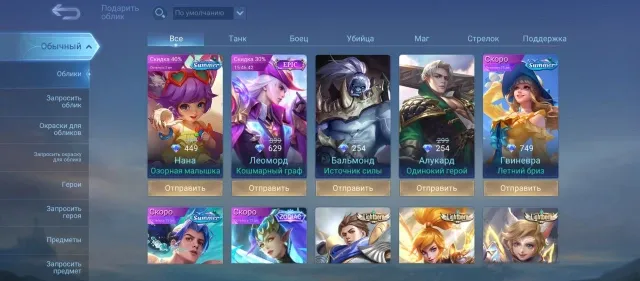
- Switch to the skins or painted skins category.
- Select the desired item.
- Choose the recipient and complete the transaction.
Limitations and Special Rules
Not all items in the game are available for gifting at all times.
- Limited Skins: Skins tied to collaborations (like anime crossovers) or seasonal events (Christmas, Halloween) can only be gifted while they are officially available in the shop.
- Level and Friendship: Usually, you need to reach a certain account level and have been friends with the recipient for a few days before gifting is enabled.
- Other Items: Besides heroes, you can gift emotes and the Starlight Card (Starlight Member), which is a great bonus for active players.
If you need Diamonds for a gift, you can always top up your balance at gamesdrop.io. It’s a fast and secure way to get game currency for yourself and your friends. We also offer vouchers for other popular titles like PUBG Mobile.
FAQ: Frequently Asked Questions
Q: Can I gift a hero using Battle Points (BP)? A: No, gifts in the shop can only be paid for with Diamonds.
Q: What happens if I gift a skin my friend already owns? A: In that case, the skin will be converted into skin fragments, so it's better to check if your friend already has the item beforehand.
Q: How do I gift a Starlight Member? A: In the same gift section, select the "Starlight Card" and send it to your friend—this will activate the pass on their account.
Ready to Level Up Your Gaming?
Get the best rates on game currencies and gift cards at GamesDrop